Available now for Microsoft Excel · Windows + Microsoft 365
ISO/IEC 27001 certified

Speed up your work in Excel.

Extract, verify, and compare data from PDF documents without leaving your Excel spreadsheet. Especially if you are an auditor.

Everything you need for testing in Excel.

Getting started with IndexFrog is easy thanks to our library of short, practical video tutorials. Each guide walks you through a specific feature with clear explanations and real examples.

Table Matching

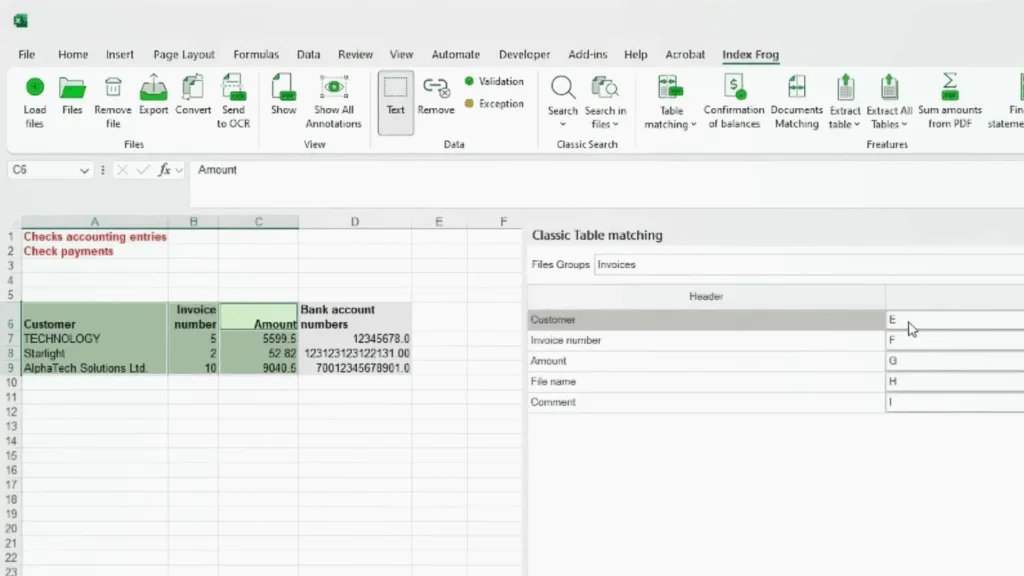
Table Matching lets you compare data from an Excel table with data from a source document table, helping you identify matching items, differences, or missing values between the two tables.

Watch the tutorial →
Table matching between a PDF and Excel

Why auditors choose IndexFrog.

IndexFrog transforms how audit teams work in Excel. From document analysis to data extraction — it saves time, ensures consistency, and simplifies even the most complex processes.

Hundreds of working hours saved

Over 60% of time was saved on performing detailed testing, and over 70% on controlling it.

Lower business risk

Less human errors, standardized audit trails, and improved traceability.

Centralized document handling

No more binders — everything is in one place, directly in Excel.

Knowledge retention & continuity

Tasks, notes, and source documents stay together — no more guesswork during reviews or handovers.

Start with a minute

IndexFrog is quick to set up and easy to use from the start — no technical barriers, just instant value from your first interaction.

Try IndexFrog on a real engagement

Twenty minutes with our team — we'll open one of your real files and reconcile a vendor statement live. No slides, no decks.

Trusted by audit teams

What our users say
about IndexFrog.

Eight firms across Europe, one common verdict — comparable functionality to legacy tools, materially better value for money.

01 / 08

We have been using IndexFrog since January 2026 to support audit documentation and data verification in Excel. The transition from DataSnipper was very smooth, as existing files and snippets could be continued without data loss. The tool offers intuitive document referencing, data extraction, and reconciliation features that significantly streamline our daily work. With comparable functionalities and competitive pricing, IndexFrog offers better value for money.


PKF
Tomasz Zaniuk
Business Intelligence Director, PKF

For many years, our team relied on DataSnipper to streamline audit documentation and data extraction. After transitioning to IndexFrog, we found that the platform delivers comparable functionality, ease of use, and quality of results. The intuitive interface, robust capabilities, and smooth implementation have confirmed that IndexFrog is a reliable alternative that allows us to maintain our high standards of accuracy and quality while offering a more cost-effective solution.


Baker Tilly
Monika Tuzimek
Partner, Baker Tilly Poland

IndexFrog has noticeably improved the efficiency of our document review processes. Tasks that were previously manual and time-intensive can now be completed much faster and with greater consistency. The tool integrates well into our existing workflows and delivers immediate productivity gains.


Stehle, Hollaender & Partner
Thomas Baur
Partner, Stehle, Hollaender & Partner mbB

We started using IndexFrog right in the middle of peak season, and within just two weeks we could already see clear benefits. The implementation was smooth and efficient, significantly improving our efficiency when working with source documents. A great example of how quickly the right tool can deliver value.


Polska Grupa Audytorska
Sandra Niespodziewana
Director of Financial Audit & Quality, PGA

IndexFrog has the potential to significantly improve our work with documents and data. By automating processes in Excel, it helps reduce analysis time and minimize the risk of errors. It is an intuitive tool that can enhance the efficiency of audit teams.


I-Audit
Maciej Skorzewski
CEO, I-Audit

After a thorough trial period, we decided to implement IndexFrog. IndexFrog has seamlessly integrated into our systems, consistently delivering high quality performance. Its powerful features have streamlined our processes and significantly enhanced our auditing efficiency, ensuring our teams can maintain the highest standards of quality in the activities we conduct for our clients.


TPA Revizija
Aleksandar Latinović
Manager, Audit Department, TPA Revizija

IndexFrog has significantly improved the efficiency of our work with audit documentation and data extraction. Its intuitive interface and powerful automation features allow our team to process documents faster while maintaining high standards of accuracy and quality.


Baker Tilly
Erik Krajňák
Director, Audit & Advisory, Baker Tilly Slovakia

Our team used DataSnipper for a short period to support audit documentation and data extraction. After transitioning to IndexFrog, we found that the platform delivers the functionality and ease of use we were looking for. Its intuitive interface and strong automation capabilities help us process documents efficiently while maintaining high standards of accuracy and quality.


Baker Tilly
Igor Arbutina
Partner, Baker Tilly Croatia

Find clear answers, fast.

Common questions about IndexFrog — from installation and key features to troubleshooting and best practices.

References

Is it possible to make more than one reference in the same Excel cell?+
Yes. For Text, hold Ctrl on your keyboard and make selections. For Validation, Exception, and Sum, just stay on the same cell and make the selection — in this case, there is no need to use Ctrl.
I summed up many items in one Excel cell, but one item was mistakenly included in the sum. How can I remove it?+
To remove an item from the sum, select the cell with the sum, hover your mouse over the mistakenly added item, right-click it, and choose "Delete index." The annotation will disappear, and the sum will be updated.
Can IndexFrog work with handwritten text?+
Actually, it can — as long as the handwriting is legible.
Is it possible to see all selections made on the document?+
Yes, you can use the Show All Annotations button on the ribbon to display all references on the documents.
Is it possible to navigate from the annotation on the document to the Excel cell?+
Click 'Show All Annotations' on the ribbon, hover over the border of an annotation until the mouse pointer turns into a hand, then left-click.
Can I copy an Excel cell with a reference?+
Yes, go to the specific cell with the reference(s) and use the standard shortcut Ctrl+C and Ctrl+V.

Haven't found what you're looking for?

Whether you're having trouble with the plugin, have questions about how it works, or simply didn't find the answer you need — our team is here to help. Don't hesitate to reach out!

Contact IndexFrog →

Get in touch.

We're here to help you get the most out of IndexFrog — just leave a message and we'll get back to you as soon as possible.

Office

Digital TPA sp. z o.o. sp.k.
pl. Władysława Andersa 5
61-894 Poznań, Polska
✉ office@digital-tpa.com
NIP 7831867001
KRS 0000997190
REGON 523492113
We'll get back to you within one business day.

Speed up your
work in Excel.

See how IndexFrog fits your workflow. Twenty minutes with our team — no slides, no decks.